
Recently we looked at how to get started on Twitter and how to set up a Facebook page for your business. Today I want to show you how to get going on LinkedIn.
I think LinkedIn is the most under rated social media tool available. It’s an incredibly powerful way of connecting with literally millions of professionals. It’s also easy to use and has recently become a lot more content rich with the ability to add images, video and other media to your individual or company profile. In effect, it’s a great way to have a free website representing you and your company in a professional way online. People can follow you, connect with you, send you messages and it’s a great source of business information. You can also recommend companies and users and build a profile that grows your credibility within your industry. Greeting Card Agents and Card Retailers in particular would benefit greatly from this free platform.
Before you start, make sure you have a nice professional looking digital photo of yourself, a digital copy of your company logo and some images of your shop or product offering. Then head over to www.linkedin.com and enter your contact details and a password to get started. Complete your details on the next page including the company you currently work for and click Create My Profile. On the next step you can add your email address so that LinkedIn can easily connect you with people already in your email system. They won’t do this without asking you first and you can skip this step. Next confirm your email address. You can also tweet or facebook message that you are on LinkedIn and invite people to connect with you. The penultimate step allows you the option of signing up to the premium service should you wish to. Lastly you can improve your profile by updating your experience, education, photo, skills and expertise and details.
The most important parts of your profile are your photo and your current workplace. I recommend keeping your profile focused on industries relevant to your current businesses and keywords for SEO purposes. Your education, etc is only relevant if you’d like to reconnect with old school friends in a more formal way than via Facebook. You can customise yourLinkedIn account at any time by hovering your mouse over the Account & Settings icon at the top right and selecting Privacy & Settings.
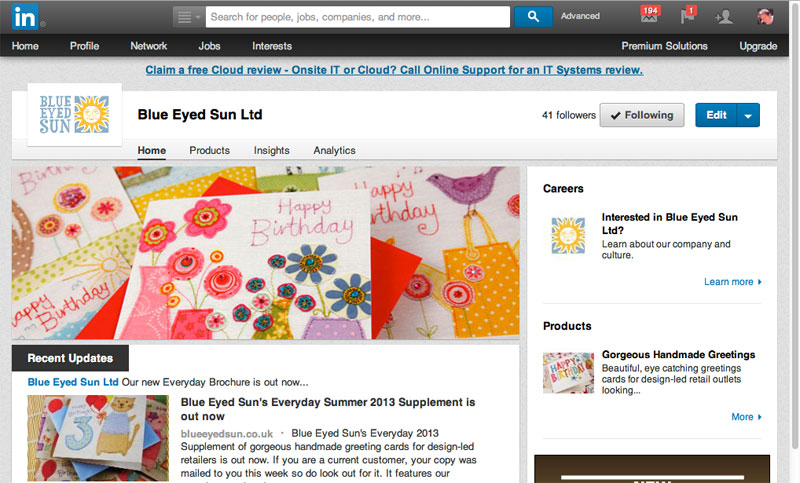
To add a company page to LinkedIn, move your mouse over the Interests menu at the top and select Companies. Click Add a Company at the top right of the next page if your business is not already listed. Follow the instructions and once you have set up your company page you can add a nice image of your shop or products. See our Blue Eyed Sun page here for an idea of how it can look: http://www.linkedin.com/company/blue-eyed-sun-ltd/
Good luck setting up your LinkedIn profile and company page. Have fun playing with it and if we do business together or have met through the industry do connect with or follow me at http://www.linkedin.com/in/jeremycorner
15 Top Tips for Using LinkedIn for your Business
To find out more about setting up your company page you might like to watch the LinkedIn training video below: